
Yes, you can easily set specific blackout dates on your OnBuoy moorage calendar to indicate periods when you won't be able to accommodate guests. This ensures flexibility and allows you to manage your availability based on your schedule.
Here's a step-by-step guide to block out specific dates:
- Access Your Listings: Log in to your OnBuoy account and navigate to your profile where you can manage your listings.
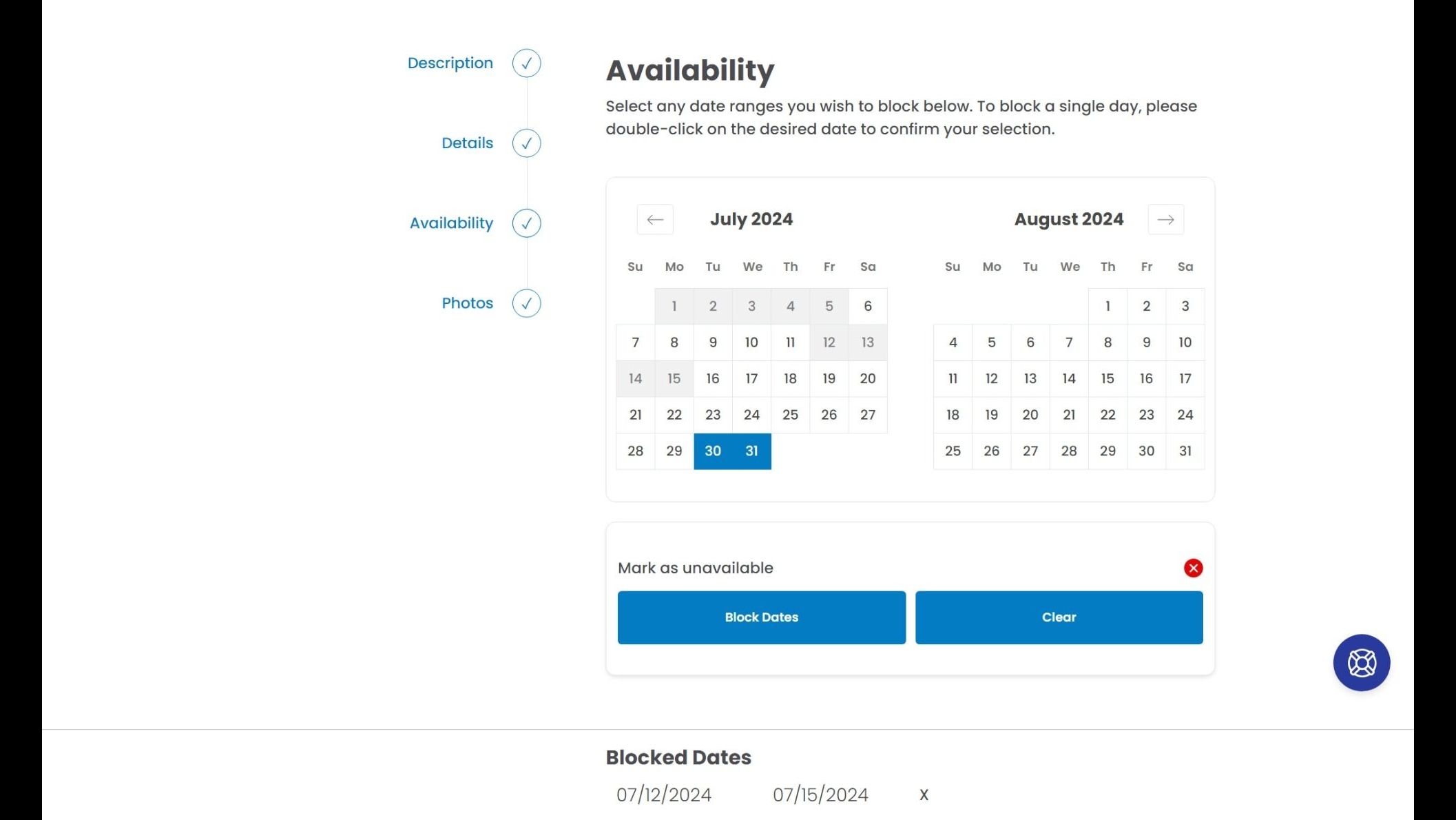
- Manage Availability: Locate the specific moorage listing for which you want to set blackout dates. Look for an option titled "Manage Availability".
- Select Blackout Dates: Click on the calendar and choose the start date of the period you want to block off. Then, click on the end date to define the entire timeframe.
- Confirm Selection: Once you've chosen the desired dates, look for a button labeled "Block Dates" under the calendar. Click on this button to confirm your selection and mark those dates as unavailable for your moorage.
Remember that blackout dates only affect new reservation requests. Any existing bookings confirmed before setting the blackout dates will still be honored. Reach out to the guest and the OnBuoy team if you need to cancel a reservation. To learn more about canceling a reservation, check this FAQ out here.